
Welcome to Field of Dreams

We are here to share all new networking and other tricks (facebook.com/shinesgeorge)

Welcome to Field of Dreams

Page under maintanice (facebook.com/shinesgeorge)

Welcome to Field of Dreams

We are here to share all new networking and other tricks (facebook.com/shinesgeorge)

Welcome to Field of Dreams

We are here to share all new networking and other tricks (facebook.com/shinesgeorge)

Welcome to Field of Dreams

We are here to share all new networking and other tricks (facebook.com/shinesgeorge)

player

page is under construction...

Retrieving The PostID, To Recover A Deleted Post

One of the challenges of using the Blogger "Edit Posts" menu (in the Classic Blogger GUI) or the "Posts" menu (in the New Blogger GUI) is the too easy ability to delete posts, if you are not thinking about what you're doing. Fortunately, under the right circumstances, accidental deletion of a single post won't cause a terrible catastrophe - though you (the blog owner) will need to react properly.
There are several ways to recreate or recover a post, after it's accidentally deleted from your blog. Only one way will let you recover the contents, published to the same URL as before.

  • Recover from the blog feed, using scraped text.
  • Recover from search engine cache, using scraped text.
  • Recover from search engine cache, using the PostID.
The PostID, similar to the BlogID, is a non publicised identifier, which is attached to a post, when it's published to the host blog.

If you delete a post that's been cached by the search engines, you can retrieve the PostID from the cached content. Combining the BlogID and the PostID, you can directly access the Post editor display for the post itself, and re publish the post.

First, retrieve the BlogID. Next, do the same with the PostID.

The previous post in this subject, Recovering A Deleted Post, was cached by the search engines some time ago. Doing a search engine cache search, I can find a cached copy of that post.

Looking at the source code for that page, as cached, I look for (some line breaks inserted, here)
<div class='post hentry'>
<a name='8899607620317019913'></a>
<h3 class='post-title entry-title'>
<a href='http://blogging.nitecruzr.net/2012/01/recovering-deleted-post.html'>
Recovering A Deleted Post</a>
</h3>

There's the PostID
8899607620317019913

Adding the PostID and the BlogID, I can now access the post editor, using the Classic Blogger GUI, as
http://www.blogger.com/post-edit.g?blogID=24069595&postID=8899607620317019913
With the New Blogger GUI, the URL is just slightly different.
http://www.blogger.com/blogger.g?blogID=24069595#editor/target=post;postID=8899607620317019913;

From there, I simply
Publish Post
or
Publish
or
Save
or
Update
depending upon what the Post Editor offers -
and my post, with all content and with the original URL, comes right back online.

If you have this problem, just do the same with your blog and page / post - and (hoping that your blog is cached) you should get similar results. I'll note that the post editor session, for a given blog, can only be used by a blog author or owner - this is not a security risk. Try editing my post, using the URL above, if you don't believe me.
The Problem, With Publishing Our Blog Posts To FaceBook, Does Not Apparently Have A Simple Cause

The problem of publishing our blog posts to FaceBook, initially observed several days ago, has generated some controversy - and much confusion, in Blogger Help Forum: Something Is Broken. Suggestions about its base cause are numerous - and variant.
  • Initially and at first glance, it appeared to involved posts containing lots of pictures.
  • Some folks have suggested that it involves use of the New GUI Post Editor.
  • Other folks insist that it's the result of a FaceBook decision, that may have targeted Blogger as a spam host.
  • Still others insist that it results from use of the Share button in the blog, vs the "Update Status" wizard in FaceBook itself.
  • One blog owner gave a very interesting explanation involving FaceBook, and Open Graph.

The problem has been reported to Blogger Support - though no response, to my report, has yet been seen. My asking, a few times, whether anybody has successfully reported the problem to FaceBook Support, has either been ignored or vigourously rejected, by all involved in the arguments.

The one sure thing, that I've observed so far about this problem, is that there is not apparently one sure thing causing this problem. I've done several tests, and published a few posts into my FaceBook Wall, successfully - using both the Share button, and "Update Status". Perversely, I was able to reproduce the problem reported by one blog owner.

My immediately previous post - Choose Your Registrar, When Buying A Domain - was composed using the New GUI Post Editor, contains pictures, and was published to my Wall using "Share to Facebook", with no problem. I just published this post, using The New Blogger GUI Post Editor and "Update Status", onto my Wall. If you examine my Wall, you'll see earlier posts, composed using the Classic GUI Post Editor, also.

I will continue to keep my rollup discussion open, for reporting diagnostic details - and respectfully request that only diagnostic details be posted there. Until either Blogger Support and / or FaceBook Support take ownership of the problem, and promise a resolution, no objectively provided diagnostic detail is unnecessary. Your observations, whenever provided, could provide the final, necessary clues, and lead to the diagnosis of the problem.

If anybody would like to discuss my diagnostic efforts to date - and especially if there are any FaceBook Support personnel reading this, I have a second discussion in progress, with one helpful blog owner.

Please, be objective. Observe both the etiology of Blogger problems, and the epidemiology of forum discussions.


(Update 2012/01/94): It appears that most people are now able to post to FaceBook. Some people are now reporting a new annoyance
You are attempting to post a link that has been marked as abusive and/or spammy.

(Update 2012/01/02): Blogger Support was aware of the problem last week, tried to contact FaceBook then, and has heard nothing in return. Their analysis of the problem, made last week, is that the problem is outside their control.

Deletion Is Not An Alternative, If You Cannot Authenticate Yourself Or Recover Access

Some supposed blog owners, unable to login to their Blogger accounts because they forgot the Blogger account name or password (or never bothered to remember either), try to compromise. They figure that, if they can't regain access to the blog, then Blogger will be willing to simply delete the blog - and everybody will be happy. They appear to have overlooked the repeatedly stated policy, which promises us that our blogs will be ours, as long as we wish to own them.

The problem is, blog deletions are as sensitive to illegal action as account recovery - and illegal actions are a very real threat to our blogs.

Just as Blogger exercises due diligence in requiring proper authentication for Blogger account recovery, any requested deletion of any supposedly owned blog should be no less controlled.

Blogger promises us
Blogger accounts and Blog*Spot addresses do not expire.
This means that our blogs will not be deleted, or transferred to the control of another person, without careful validation of the person requesting the deletion or transfer. If the other person cannot prove rightful ownership of the blog in question, Blogger is not legally entitled to delete the blog, any more than they are entitled to transfer control of the blog.

We are permitted to own and publish our blogs, without any minimal required activity, and without any required proof of our real life identity. We are entitled to publish our blogs when we see fit - and are entitled to come back to our blogs after any length of time - if we are able to authenticate ourselves.

Blogger will not harass us when we are inactive, whether or not anybody else intends to publish to our URL with more vigour. Neither will they give anybody else control of our blogs, either to publish - or to delete. Similarly, they won't give me - or you - access to somebody else's blog, or harass somebody else.

If you find yourself unable to access your blog, and delete it on your own, try using the improved Google account recovery wizard, before asking that Blogger delete your blog for you. In limited cases, the Google tool Removing Content From Google may be useful. Finally, concentrate on making your blog or website more useful, and organically improving your reputation.

Setup An Audit Trail For Your Team Blog

Ever since Blogger gave us the ability to have team blogs, blog owners have been asking
How do I track what my authors are posting?
as if Blogger blogs have an audit trail option. The unfortunate truth is that Blogger is a website publishing platform - it is (or was, at one time) called
Blogger One Button Publishing
Blogger, quite simply, is not a Content Management System.

However, even if Blogger does not provide a packaged audit trail, which would be a standard feature in any CMS, this does not mean that we cannot set one up, with very little work. If you publish a team blog (or a single owner blog), you already have this option.

The display medium, for a Blogger blog audit trail, is quite simple - your email Inbox. Both Comments and Posts, when published, can post to your Inbox. How to generate the audit trail depends upon whether the blog is public, or private.

Any blog, public or private, can provide an audit trail using email from comments (aka "Comment Notification"), and from posts (aka "BlogSend").

A public blog, which publishes a blog feed, can alternately provide an audit trail using FeedBurner email distribution. Formatting options for FeedBurner email distribution are much more flexible.

Whether your audit trail starts from BlogSend / Comment Notification, or FeedBurner email, just setup a few email filters, and store all Blogger audit trail email in a properly named folder. And there's your audit trail.

Identifying And Removing Deviously Engineered And Marketed Blog Hijacks

We saw the symptoms of the first carefully engineered blog hijacks, in Blogger Help Forum: Something Is Broken, two years ago. During each succeeding holiday season, each attack has apparently become more and more deviously engineered.

This season - each season starting in Fall of one year and lasting until Spring of the following year - we are seeing a hijack complement which appears to be devious in both marketing and installation technique, and which requires a complex search of the affected blogs. If you are receiving reports from your readers
Your blog starts to load - but is quickly replaced by a page full of advertisements!
you may need to exhaustively examine your blog for any third party code - and as always, the problem code may have been installed at any time in the past. When discovered, the hijacks are not consistently found in recently installed code.

The blog hijacks, being examined during this holiday season - appear to be deviously planned and marketed.
  • The hijacks use a variety of host accessories and gadgets.
  • The hijacks use a variety of distribution libraries.
  • The hijacks are being marketed to a diverse audience, which causes different installation techniques - and necessitates the complex search of affected blogs.

To find and remove a hijack from an affected blog, you'll need to start by viewing the blog in question, using a text only browser, or proxy service. I, personally, use several products.
  • hpHosts vURL is a text only browser, that runs as a stand alone application locally on your computer.
  • Notepad-Plus-Plus is an offline text editor, which provides a variety of search tools for text files. You can sometimes avoid use of your browser completely, by copying page source code directly from vURL.
  • Rex Swain's HTTP Viewer is a standard online text proxy that I use.
  • Lingo4you HTTP Web-Sniffer is an online alternative to Rex Swain.
All of these products may be more or less useful in identifying the source of your specific hijack. The Rex Swain and Web-Sniffer text proxies each have their effective differences.

If anybody uses alternative products, and cares to share information about the tools used, I will most gratefully add them to my library here.

The approach here is complex.
  1. Of course, backup the template, before starting.
  2. Load the blog, in question, in the text browser / proxy display of your choice.
  3. Do a simple text search for the identified host / target name in the URL, such as "adiwidget", "pagesinxt", or "ripway".
  4. You'll see several different possibilities.
    • The search may reveal the hijacking code in an HTML gadget. You can use the "Pages Elements" / Design tab (Classic GUI), or the "Layout" wizard (New GUI), and remove the offending gadget.
    • The search may reveal the hijacking code in the template HTML. You'll have to use the Template Editor, and remove the offending lines of code.
    • The search may not find any identified host name, in a text search. You'll have to do an extensive text search, looking for unknown HTML / JavaScript gadgets / snippets of code, and evaluate each gadget / snippet, on the fly.
  5. You may need to bypass the Blogger menu structure, to directly access the Blogger wizard needed, if trying to use the Blogger menus is also a problem.
  6. Clear browser cache, before checking for success.
  7. And always backup the template, again, after completing this task.

And hopefully, having found and removed a hijack from your blog, you will learn to be more discrete, in your choice of accessories and gadgets, in the future.

Custom Domain Publishing - Moving Back To BlogSpot, Using The New GUI, Isn't Obvious

The New Blogger GUI (2011) has been available for just over 6 months - and we see new confusion about using it, daily, in Blogger Help Forum: How Do I?.
How do I cancel my custom domain redirect, in the New GUI?
This is one specific question, that's been asked, recently.

The answer to that specific question is actually right there, in front of us - we just don't see it.

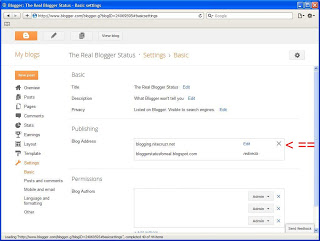
Blogger, like Google, likes to use overlay panels for some displays, such as how you see the picture below - when you click on it.

In the new GUI, if I look at the Blog Address settings for this blog, in Settings - Basic - Publishing, I see
      
                     
   See the "X"?
    (Click on the picture, to better see the details.)


 "Edit" is a link, that lets me "Edit" my custom domain settings. The "Edit" wizard (which simply pops up in the same display, when I click on "Edit") does not let me change the URL of the blog back to BlogSpot - and this is the start of some confusion.

To remove the custom domain redirect, one must click on the "X" in the top right. With the publishing shown as

blogging.nitecruzr.net                Edit               X
bloggerstatusforreal.blogspot.com redirects
clicking on the "X" lets me remove the custom domain redirect. Clicking on "Edit" only lets me change specific custom domain settings, such as selecting the "naked domain" redirect option.

When you click on the "X", you will get a verification popup.
Are you sure? This will remove the current custom domain.
And you'll want to hit "Yes".

So, click on the "X" (it's actually in black - I show it in red, above, to make it more obvious), to clear the custom domain redirect and publish back to the original BlogSpot URL. If you don't see the "X", click in the upper right corner of that window - to the right of "Edit" and just left of the window border. Apparently, not all browsers display the "X" properly. 

The Involuntary "Adult Content" Warning Is Collaborative

Some blog owners find evidence of opinion from their viewers, but cannot accept the opinions expressed.
Why is there a "Content Warning" on my blog?
They don't understand the collaborative opinion being expressed, when this warning is displayed.

Long ago, the "Flag Blog" link, in the navbar, was a misunderstood feature. The "Flag Blog" button was later replaced by the "Report Abuse" link, with multiple classifications of offenses.

The text of the warning is somewhat self explanatory.
Some readers of this blog have contacted Google because they believe this blog's content is objectionable.
The conclusion here is simple.
  1. The opinion is collaborative - multiple readers have expressed this opinion.
  2. The blog content is offensive - the readers object to this content.

If you are seeing this warning displayed in front of your blog, there are several possible causes.
  • You are accepting contributions from other people, and not carefully checking what you accept.
  • You are pushing the limits - a bit too far.
  • You are marketing your blog, inappropriately.

You have several choices.
  • Objectively examine the content in your blog, and remove anything objectionable.
  • Market your blog more carefully, to a more appreciative audience.
  • Set the voluntary "Adult Content?" option to "Yes".
  • Accept the involuntary warning.

You publish your blog to educate or entertain your readers, right? Why spend time providing content that your readers don't appreciate?

What's The Canonical URL Of My Blog?

This blog is (for those of you not familiar with it) "The Real Blogger Status". The URL of this blog is currently "http://blogging.nitecruzr.net". As long as I publish the blog properly (as "blogging.nitecruzr.net"), I am allowed to advertise the blog using any combination of lower case and upper case letters, that I like. This blog can be accessed as "blogging.nitecruzr.net", "Blogging.Nitecruzr.Net", or even "BlOgGiNg.nitecruzr.net". We say that Blogger URLs are case insensitive.

Even with my readers allowed to use any combination of lower and uppercase letters, to access this blog, I don't want the search engines to index (and determine page rank) my blog using the exact URLs, as typed by each different reader. Even with this blog being addressed as "blogging.nitecruzr.net", "Blogging.Nitecruzr.Net", or even "BlOgGiNg.nitecruzr.net", the search engines index this blog as "blogging.nitecruzr.net". To help this happen, Blogger provides the "canonical" tag, in the blog header.

Every Blogger blog, which has a standard and up to date header, contains a "canonical" tag. The tag provides the base URL of the blog, in all lower case letters, so the search engines know how to ignore various syntax variations.
All links are indexed under one unified URL, providing better SERP positioning, and more search engine generated traffic.

Look at the source for this blog home page, in the header. Note that you have to look at the online "source code" - not at the raw HTML, using the Template Editor!

Here's an excerpt of the header for this blog, with a few line breaks added - and some lines removed - to make it more readable.
<head>
<meta content='IE=EmulateIE7' http-equiv='X-UA-Compatible'/>
<meta content='width=1100' name='viewport'/>

...

<link href='http://blogging.nitecruzr.net/favicon.ico'
rel='icon' type='image/x-icon'/>
<link href='http://blogging.nitecruzr.net/' rel='canonical'/>
<link rel="alternate" type="application/atom+xml"
title="The Real Blogger Status - Atom"
href="http://blogging.nitecruzr.net/feeds/posts/default" />
<link rel="alternate" type="application/rss+xml"
title="The Real Blogger Status - RSS"
href="http://blogging.nitecruzr.net/feeds/posts/default?alt=rss" />
<link rel="service.post" type="application/atom+xml"
title="The Real Blogger Status - Atom"
href="http://www.blogger.com/feeds/24069595/posts/default" />
<link rel="EditURI" type="application/rsd+xml"
title="RSD" href="http://www.blogger.com/rsd.g?blogID=24069595" />
<link rel="openid.server" href="http://www.blogger.com/openid-server.g" />

There it is.
<link href='http://blogging.nitecruzr.net/' rel='canonical'/>


My test blog, "Nitecruzr New Template Laboratory", is still published to "nitecruzrtestnew.blogspot.com".
<link href='http://nitecruzrtestnew.blogspot.com/' rel='canonical'/>


These records are essential, for blogs published to "blogspot.com", now that Blogger is aliasing our blogs using country code TLD URLs. My test blog, for instance, published to "nitecruzrtestnew.blogspot.com", will be accessed as "nitecruzrtestnew.blogspot.in" in India - but the search engines, which observe the Canonical tag, will still index any links as "nitecruzrtestnew.blogspot.com".

BlogSpot Published Blogs Being Accessed Using Country Code TLDs

Recently, some blog owners outside the USA have been asking about mysterious redirects which they (or their readers) are seeing, when accessing their blogs.
Why is "xxx.blogspot.com" now redirecting to "xxx.blogspot.com.au"?
and
Why was my blog address recently changed from ".com" to ".in"?

Blogger will host our blog content using country code relevant aliases, according to the unique laws of each different country. The relevant CC alias will be accessed automatically, according to the network location of the reader in question. These aliases are being added on a country by country basis, with Australia ("blogspot.com.au") and India ("blogspot.in") apparently recently deployed.

This will let Blogger remove content, that's illegal in one country, without having to remove that same content for all of your readers, worldwide. You benefit, because your blog won't go offline, for the entire world, when you publish something that's illegal in one single country.

With any BlogSpot published blog containing a standard Blogger header, the blog will have a canonical reference to the "blogspot.com" alias. The search engines will index the blog, using the "blogspot.com" alias - even when following a country code specific link.

The search engine ranking of your blog won't be affected - except that a blog, left online in most countries, will get more traffic than one taken offline worldwide. When you check the Page Rank, you should continue to check the "blogspot.com" URL, because all search engine reputation will accumulate under the "blogspot.com" alias.

Owners of older or uniquely developed blogs, possibly using Classic or highly customised templates, may want to check the headers in their blogs, and make sure that they have a "canonical" tag referencing their "blogspot.com" alias.

Blogs published to non "blogspot.com" URLs, using properly setup and fully operational "custom domain" publishing, will not be affected - as the default "blogspot.com" URL is already redirected to the domain URL. While a newly purchased custom domain is "In Transition", the domain redirect will not be in effect - and the "blogspot.com" URL will be subject to CC alias redirect.

Any reader using a browser or computer that's affected by domain based filters will need to check all filters. Add "blogspot.com.au", "blogspot.in", "blogspot.jp", or any other relevant country, wherever "blogspot.com" is specified.

Note that the redirect uses geolocation, to identify a relevant country code. Readers in small countries, or located near the border of other countries, may be using an ISP located in a different country, and may find their personal redirect reflecting the other country.

Any reader wishing to bypass the local alias can access a "no country redirect" alias using the URL of "blogspot.com/ncr". Similar to the "ncr" URL modifier used to bypass local language redirects of "blogger.com", this will give access to the U.S. English alias of the blog of your choice.

Make A Custom Pages Index For Your Blog

Even before Blogger added static pages as a blog feature, blog owners have been asking how to make hidden or separate pages for their blogs. When static pages, and the Pages index gadget, were added, people started asking about indexing label searches and external links in the Pages gadget.
There are several solutions to the need to have a Pages gadget that indexes archive / label searches, and external URLs. Each solution has its advantages, and disadvantages.

If you want a Pages gadget for your blog, that indexes more than just static pages, you have two basic choices, with each choice having different possibilities.

  1. Replace the Pages gadget with a linklist. You can index any URLs that interest you, in a linklist.
  2. Use the Pages editor, in the New Blogger GUI, which lets you add URLs of your choice, directly to the Pages gadget.

I've been advising people for several years, how to make a horizontal index bar for the blog. With Designer templates, the Tabs section contains CSS that displays any linklist positioned there, horizontally. This gives you the choice of using "Add a gadget", and creating a linklist as an XML based "Linklist", or one created as an HTML based "HTML / JavaScript" gadget - and both choices have advantages.

If you look at the menu bar on this blog, you'll see how the active menu button "lights up" when selected. This feature is a CSS tweak, and requires that you use a linklist that's XML based. I created the menu bar here, using "Add a gadget", and tweaked the template code. The default Pages gadget is XML based - and does not require the latter tweak.

As an alternate, you could use the Pages editor in The New Blogger GUI - if you want to use The New GUI. If you use the New GUI Pages Editor, and you select the Pages gadget to "Show pages as" "Top tabs", your blog, when displayed using a dynamic template, will populate the black menu bar with your Pages list. When that happens, the dynamic view menu will be displayed as a drop-down list, at the far left of the menu bar.

Make A Custom Pages Index For Your Blog

Even before Blogger added static pages as a blog feature, blog owners have been asking how to make hidden or separate pages for their blogs. When static pages, and the Pages index gadget, were added, people started asking about indexing label searches and external links in the Pages gadget.

There are several solutions to the need to have a Pages gadget that indexes archive / label searches, and external URLs. Each solution has its advantages, and disadvantages.

If you want a Pages gadget for your blog, that indexes more than just static pages, you have two basic choices, with each choice having different possibilities.
  1. Replace the Pages gadget with a linklist. You can index any URLs that interest you, in a linklist.
  2. Use the Pages editor, in the New Blogger GUI, which lets you add URLs of your choice, directly to the Pages gadget.

I've been advising people for several years, how to make a horizontal index bar for the blog. With Designer templates, the Tabs section contains CSS that displays any linklist positioned there, horizontally. This gives you the choice of using "Add a gadget", and creating a linklist as an XML based "Linklist", or one created as an HTML based "HTML / JavaScript" gadget - and both choices have advantages.

If you look at the menu bar on this blog, you'll see how the active menu button "lights up" when selected. This feature is a CSS tweak, and requires that you use a linklist that's XML based. I created the menu bar here, using "Add a gadget", and tweaked the template code. The default Pages gadget is XML based - and does not require the latter tweak.

As an alternate, you could use the Pages editor in The New Blogger GUI - if you want to use The New GUI. If you use the New GUI Pages Editor, and you select the Pages gadget to "Show pages as" "Top tabs", your blog, when displayed using a dynamic template, will populate the black menu bar with your Pages list. When that happens, the dynamic view menu will be displayed as a drop-down list, at the far left of the menu bar.

Problems With Dynamic Templates And The Menu Bar / Pages Index

We're getting a few reports today, in Blogger Help Forum: How Do I?, from blog owners who publish blogs with static pages, that use the new dynamic templates, and that now have no ability to index the pages in the dynamic views. We're also seeing reports mentioning some blogs which have no menu bar visible, in dynamic views. Both problems were, reportedly, first observed mid morning today, Pacific time.

Earlier this week, if you looked at this blog in dynamic view, you could see two static pages, from this blog, indexed in the menu bar. Both Commenting Policy and Leave Comments Here were, at one time, indexed. Today, they are not.

Interestingly enough, neither page is indexed in the static template menu bar, which you can see just above. Other static pages, which were indexed in the static template menu bar, were not observed in the dynamic template menu bar.

We have a rollup discussion, where we are collecting details about your observations of these problems. If your blog is affected, please provide details in the discussion, as best as you are able.
  1. What is the published URL of the blog?
  2. Is the blog explicitly setup to use the dynamic templates?
  3. If the blog is setup to use the dynamic templates, which view is the default?
  4. Does the blog, in the non dynamic view, display the navbar?
  5. Does the blog, in the non dynamic view, display a Pages gadget / menu bar? If no, where are the pages indexed?
  6. Did you setup the Pages gadget using the Classic Blogger GUI, or the New Blogger GUI?
  7. Have you enabled the Mobile Template, for this blog?


(Update 2011/11/14): It appears that this problem originates with blogs using a custom Pages gadget. Blogs that use a standard Pages gadget, created in the New Blogger GUI Pages editor, seem to be OK. Here, you may view my test blog - both using a dynamic view, and similarly using a non dynamic view - which has a standard Pages index, positioned in the sidebar.